Quick Start
This page explains how to create basic network configurations using the OCX network via the OCX Portal.
Elements of the OCX Network
The OCX network is composed of the following elements:
- Physical Port
- A Physical Port is a physical connection point to the OCX network. Each site intended for connection requires a Physical Port.
- Virtual Circuit Interface (VCI)
- A VCI is a connection interface that can be configured after creating a Physical Port. It functions similarly to a VLAN. Once created, it can be attached to a VC.
- Virtual Circuit (VC)
- A VC acts as one large broadcast domain. It is a resource that allows you to interconnect Layer 2 logical lines such as VCIs, Cloud Connections, Router Connections, Internet Connections, Internet Gateways, Tunnel Gateways, XaaS Connections, SmartVPN Interfaces, and OPTAGE Connection Interfaces.
- Cloud Connection
- A Cloud Connection is an interface for connecting to various cloud services. It connects to a VC as a Layer 2 logical line.
- OCX-Router(v1)
- The OCX-Router(v1) provides IP routing functions within the OCX network. Once created, it is treated as a logical line called a Router Connection and can be attached to a VC.
- Internet Connection
- This function provides internet connectivity via the OCX network. It is treated as a logical line called an Internet Connection and can be attached to a VC.
- Internet Gateway
- This function provides internet connectivity using NAT (Network Address Translation) via the OCX network. It is treated as a logical line called an Internet Gateway and can be attached to a VC.
- Tunnel Gateway
- A Tunnel Gateway serves as a tunnel endpoint on the OCX side, connecting a private network built on OCX with the customer's fiber-optic line.
- XaaS Connection
- An XaaS Connection (*1) is an interface for connecting to XaaS (*2) via the OCX network. It is treated as a logical line called an XaaS Connection and can be attached to a VC.
- Access Line
- An Access Line provides connectivity to the OCX network from various connection points such as office buildings or stores.
- Access Line powered by MDA
- Realizes the connection between the fiber-optic network provided by Marunouchi Direct Access (MDA) and the OCX network.
- OCX Hikari Private
- Realizes the connection between the FLET'S network provided by NTT East/West and the OCX network.
- OCX Mobile Access
- Provides connectivity from mobile lines to the OCX network.
- Access Partner Connection
- An Access Partner Connection provides an interconnection interface between partner network access lines and the OCX network.
- SmartVPN Connection
- A SmartVPN Connection is an interface for connecting to "SmartVPN," a VPN service provided by SoftBank Corp. When created, it generates multiple SmartVPN Interfaces, and each interface can be attached to a VC.
- OPTAGE Connection
- An OPTAGE Connection is an interface for connecting to the VPN service provided by OPTAGE Inc. When created, it generates multiple OPTAGE Connection Interfaces, and each interface can be attached to a VC.
Site-to-Site Connection
Redundancy is not covered in this section. Please refer to the following link for details.
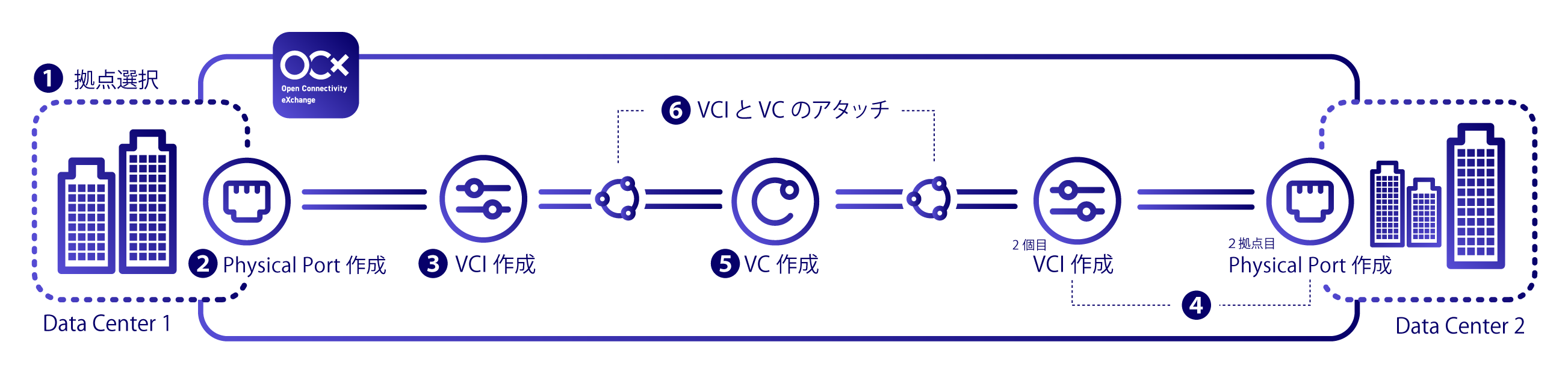
- Select a Site
- Create a Physical Port
- Create a VCI
- Create a Physical Port and a second VCI for the second site.
- Create a VC
- Attach the VC to the two created VCIs
Site-to-Cloud Connection
Redundancy is not covered in this section. Please refer to the following link for details.
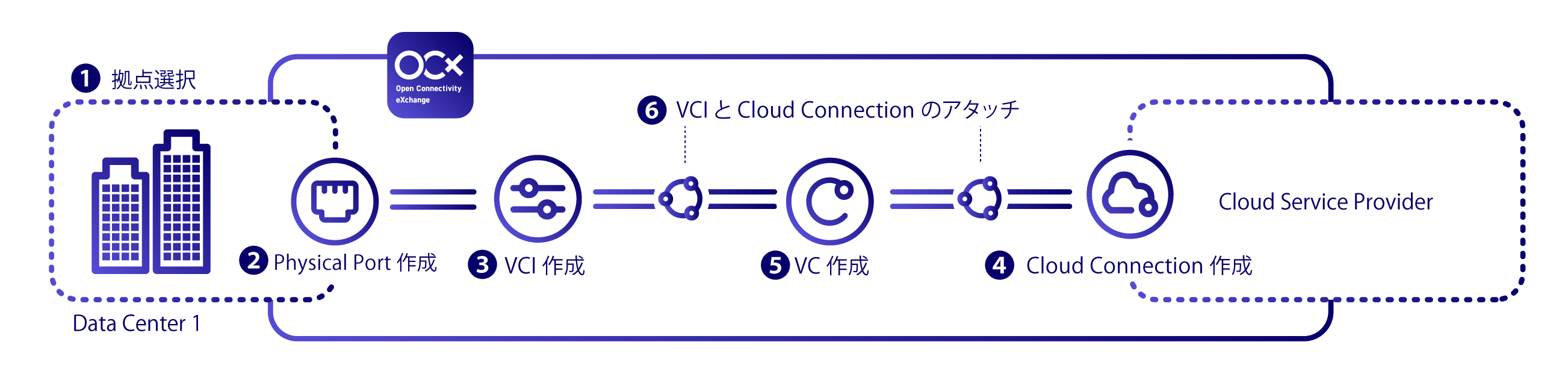
- Select a Site
- Create a Physical Port
- Create a VCI
- Select a Cloud Service Provider and create a Cloud Connection
- Create a VC
- Attach the VC to the VCI and the Cloud Connection
*1: In July 2025, the name "SaaS Connection" was changed to "XaaS Connection."
*2: XaaS (X as a Service) is a general term for various external cloud services (software, platforms, etc.).