XaaS Connection Overview
As of July 2025, the service name has been changed from SaaS Connection to XaaS Connection.
XaaS Connection provides private connectivity from the OCX closed network to designated XaaS※1 services, using either NAT functionality (SNAT) or an IPsec tunnel depending on the target service.
XaaS Connection is mainly used for the following purposes:
- To establish private connectivity to designated XaaS services without the need for customers to prepare their own NAT router.
The currently available XaaS services are listed below by category.
Available Services by Category
Column Descriptions
The meanings of the columns used in the tables for each category are as follows.
-
Connection Method: indicates the number of connection methods ("How to Connect") supported by the service.
- Select
- multiple connection methods are supported, and you may choose whichever suits your needs.
- Fixed
- only one connection method is available.
- Select
-
How to Connect: indicates the connection methods available for each XaaS. The internet connectivity requirement is listed for each connection method.
- L3
- By establishing BGP-based network connectivity between your equipment (or OCX-Router (v1)) and the XaaS Connection resource, you can communicate over XaaS Connection. No additional configuration such as IPsec or a client application is required.
- Client application / PAC file
- By establishing BGP-based network connectivity between your equipment (or OCX-Router (v1)) and the XaaS Connection resource, and deploying a client application or PAC file to your end-user environment, you can communicate over XaaS Connection. No additional configuration such as IPsec is required.
- IPsec (CPE-terminated)
- By establishing BGP-based network reachability to your equipment and configuring IPsec tunnel termination with the target service on your own equipment, you can communicate over XaaS Connection. Note that IPsec tunnel termination configuration (
IPsec Parameter) on the XaaS Connection resource is not available.
- By establishing BGP-based network reachability to your equipment and configuring IPsec tunnel termination with the target service on your own equipment, you can communicate over XaaS Connection. Note that IPsec tunnel termination configuration (
- IPsec (terminated on the XaaS Connection)
- By establishing BGP-based network connectivity between your equipment (or OCX-Router (v1)) and the XaaS Connection resource, and configuring IPsec tunnel termination (
IPsec Parameter) between the XaaS Connection resource and the target service, you can communicate over XaaS Connection.
- By establishing BGP-based network connectivity between your equipment (or OCX-Router (v1)) and the XaaS Connection resource, and configuring IPsec tunnel termination (
- L3
-
Internet Connectivity Required: indicates whether communication over the internet (in addition to the closed network) is required when using the service.
SaaS
| Service Name | SLA Applicable | Connection Method | How to Connect | Internet Connectivity Required |
|---|---|---|---|---|
| Cybozu | Applicable | Fixed | L3 | Not required ※2 |
| Microsoft Azure Peering Service | Applicable | Fixed | L3 | Required ※3 |
| ServiceNow AI Platform | Applicable | Fixed | L3 | Not required ※2 |
| Google Cloud | Applicable | Fixed | L3 | Not required ※4 |
Security Service / SASE
| Service Name | SLA Applicable | Connection Method | How to Connect | Internet Connectivity Required |
|---|---|---|---|---|
| Zscaler | Applicable | Select | IPsec (CPE-terminated) | Not required |
| Client application | Not required | |||
| Cisco Umbrella | Not Applicable | Select | IPsec (CPE-terminated) | Not required |
| Client application | Required | |||
| PAC file | Not required | |||
| Cato SASE Cloud Platform | Not Applicable | Fixed | IPsec (terminated on the XaaS Connection) | Not required |
| Cisco Secure Access | Not Applicable | Fixed | IPsec (terminated on the XaaS Connection) | Not required |
IaaS
| Service Name | SLA Applicable | Connection Method | How to Connect | Internet Connectivity Required |
|---|---|---|---|---|
| Wasabi Hot Cloud Storage | Not Applicable | Fixed | L3 | Required ※5 |
Notes
- A separate connection to DNS is required (e.g., via internet connection or private DNS).
- As of July 2025, XaaS Connection supports IPv4 only. IPv6 is not supported.
- BGP settings for XaaS Connection support eBGP only. iBGP is not supported.
- XaaS Connection does not support GRE tunnels.
- For services to which the SLA applies, please refer to the "SLA Applicable" column in the supported services table above. For details on the SLA terms, please see the XaaS Connection individual provisions in the Terms of Service.
Procedure for Creating an XaaS Connection
The required input information differs depending on the XaaS to be connected.
Please refer to the relevant creation procedure pages below.
SaaS
- Create XaaS Connection (Cybozu)
- Create XaaS Connection (Google Cloud)
- Create XaaS Connection (Microsoft Azure Peering Service)
- Create XaaS Connection (ServiceNow AI Platform)
IaaS
Security Service / SASE
- Create XaaS Connection (Zscaler)
- Create XaaS Connection (Cisco Umbrella)
- Create XaaS Connection (Cato SASE Cloud Platform)
- Create XaaS Connection (Cisco Secure Access)
XaaS Connection Configuration Items
With XaaS Connection, you create the following XaaS Connection resources and attach them to a VC (Virtual Circuit) to realize private connectivity to XaaS services.
When created by specifying a SaaS or IaaS, private connectivity becomes available to all services provided by the same provider within the same AS.
When created by specifying a Security Service / SASE, private connectivity to the designated security service / SASE is enabled.
In addition, it is possible to add NAT IP addresses used for address translation by the NAT function, as well as IP addresses assigned as the post-translation address by the DNAT function.
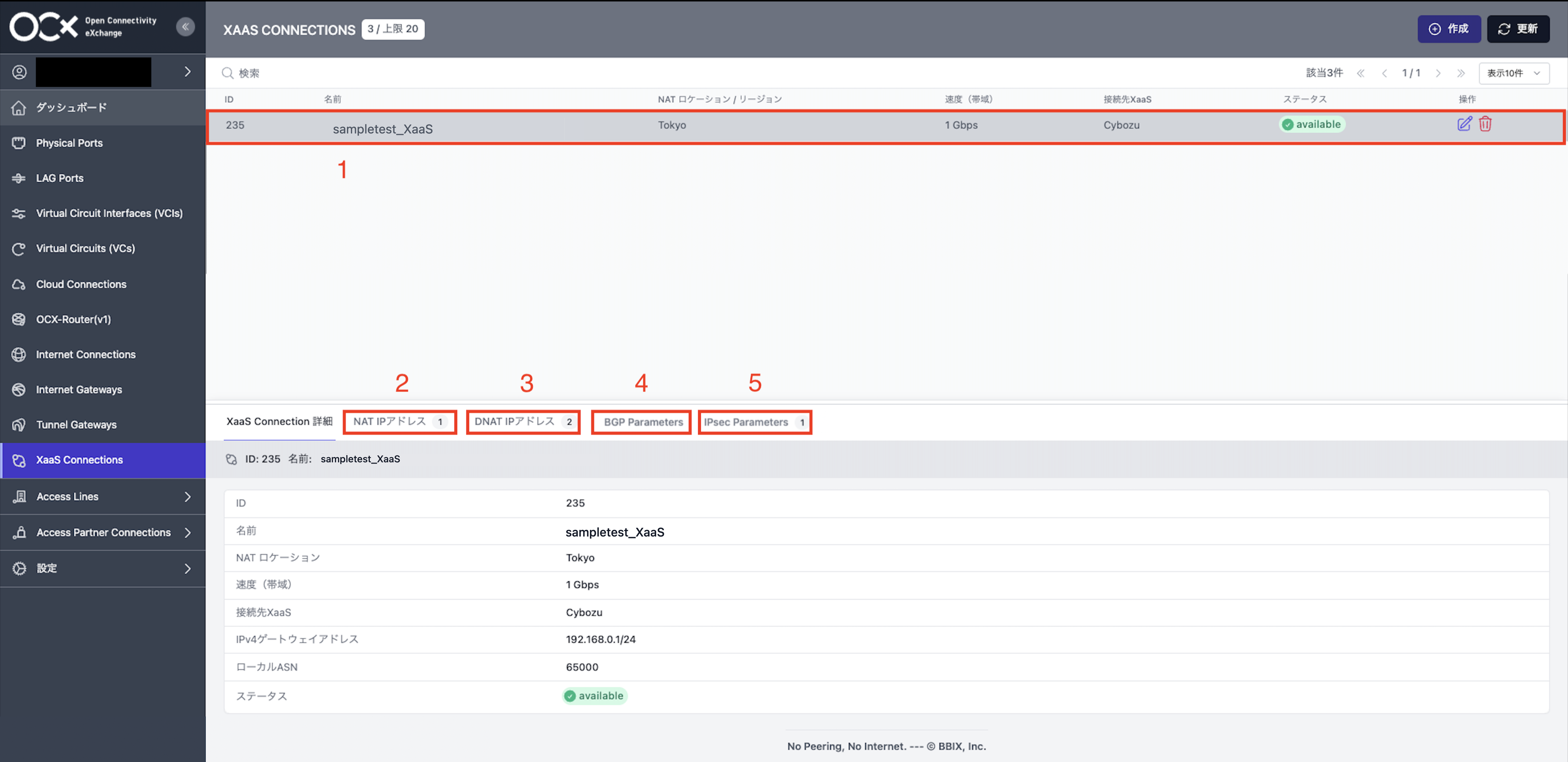
| No. | Configuration Item | Description |
|---|---|---|
| 1 | XaaS Connection (Resource) | Creates an XaaS Connection resource on the OCX network. At creation, one NAT IP address used for NAT translation is provided.※6 |
| 2 | NAT IP Address | Additional IPv4 addresses used for SNAT translation can be added to the created XaaS Connection resource.※6 |
| 3 | DNAT IP Address | Additional IPv4 addresses assigned as the post-translation address by the DNAT function can be added to the created XaaS Connection resource.※6※8 |
| 4 | BGP Parameter | Allows configuration of BGP settings for the created XaaS Connection. |
| 5 | IPsec Parameter | Allows configuration of IPsec settings for the created XaaS Connection.※7 |
Footnotes
※1 XaaS (X as a Service) is a general term for various external cloud services, such as software and platforms.
※2 Communication when using the service is available over the closed network, but some features may require an internet connection. For details, please refer to each service's creation page.
※3 The main communication is available over the closed connection, but communication with certain endpoints — such as those used for authentication or for CDN services operated by companies other than Microsoft — requires a separate internet connection.
※4 By setting the DNS destination to Google Public DNS, there is no need to prepare a separate DNS connection.
※5 An internet connection is required to access the dashboard.
※6 NAT IP addresses / DNAT IP addresses are not available for security services / SASE whose Connection Method is Fixed.
※7 IPsec Parameter is available only for security services / SASE whose Connection Method is Fixed.
※8 DNAT IP addresses apply only to XaaS Connection resources purchased on or after September 8, 2026.
For detailed operation methods, please refer to the creation, update, and deletion pages for each item.