Connection from OCX Mobile Access to Microsoft Azure Peering Service
Problem to Solve
Connect mobile devices to Microsoft cloud services such as Microsoft 365 without going through the public internet.
Solution with OCX
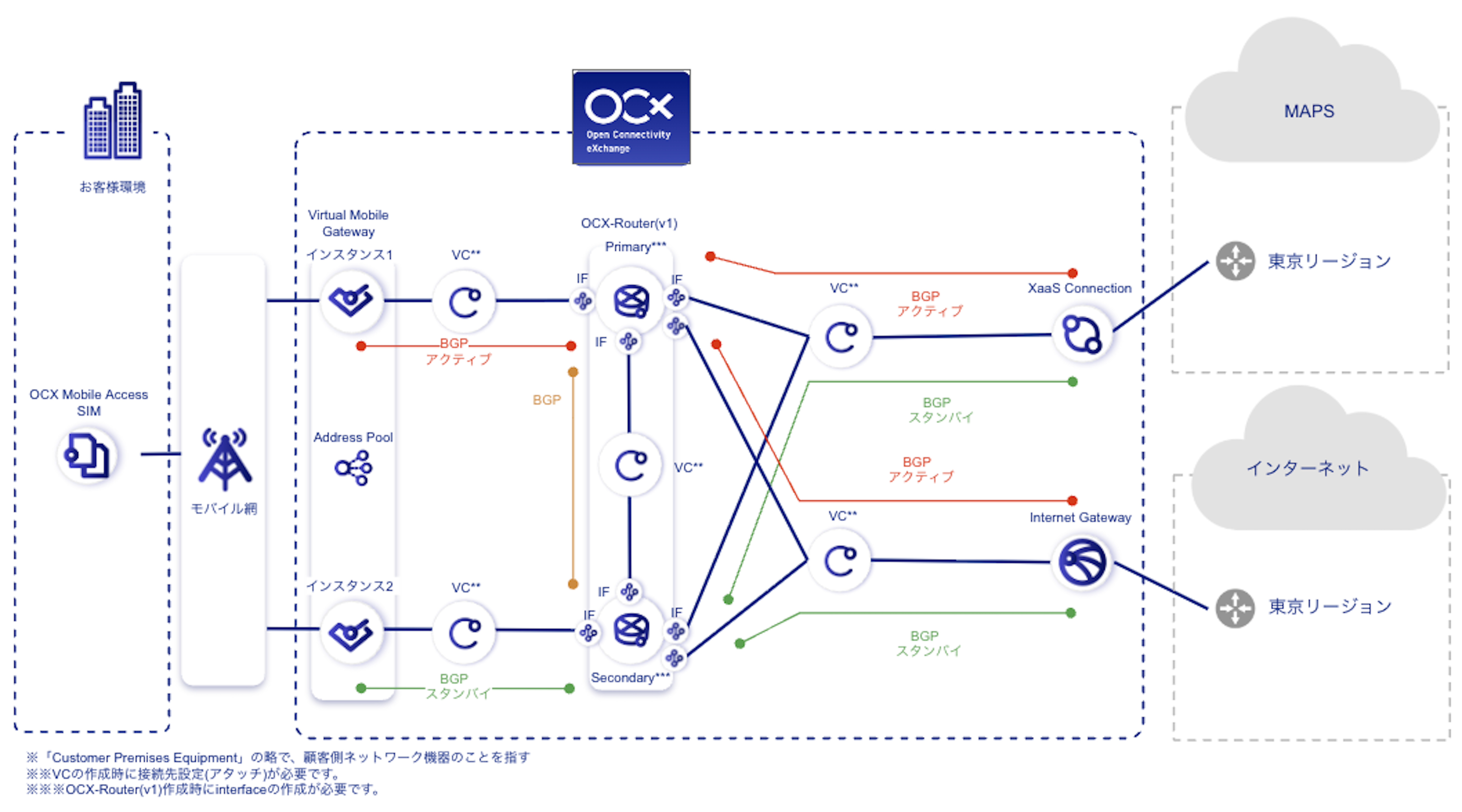
By combining the Virtual Mobile Gateway of OCX Mobile Access with XaaS Connection (Microsoft Azure Peering Service), mobile devices can connect to Microsoft cloud services over a private network.
Supported services include Microsoft 365, Dynamics 365, SaaS services, Azure, and other Microsoft cloud services that support Microsoft Azure Peering Service.
OCX Resources
| Resource | Required Quantity |
|---|---|
| Virtual Mobile Gateway | 1 (2 instances) |
| XaaS Connection (Microsoft Azure Peering Service) | 1 |
| Internet Gateway | 1 |
| Virtual Circuit (VC) | 5 |
| OCX-Router (v1) | 1 (2 instances) |
| Interface (Router Connection) | 8 |
Structure
Conceptual Diagram
Benefits
- No additional configuration is required on the Microsoft side; configuration is completed entirely on the OCX side. This makes it easy to build a private connectivity environment for Microsoft cloud services.
- Private connectivity to Microsoft services can be achieved via SIM-based mobile lines without the need for a dedicated leased line.
- Centralizing BGP settings on the OCX-Router simplifies configuration.
Notes
- Ensure that AS numbers and network segments do not overlap.
- Internet connectivity is required for services not supported by MAPS, Windows Update, and endpoints such as CDN services used by Microsoft 365 that are provided by non-Microsoft parties. In this design pattern, internet connectivity is provided by Internet Gateway. Please contact Microsoft for details on supported services.
- An East-West redundant configuration is required to meet the SLA standards for XaaS Connection.
- XaaS Connection does not support IPv6.
- For specifications and limitations of OCX Mobile Access, refer to OCX Mobile Access Overview and Virtual Mobile Gateway Overview.