Coexistence of OCX Mobile Access and OCX Hikari Private
Problems to be Solved
You want to connect to cloud services such as AWS from mobile devices and optical fiber lines via a closed network, without going through the public internet.
Solutions with OCX
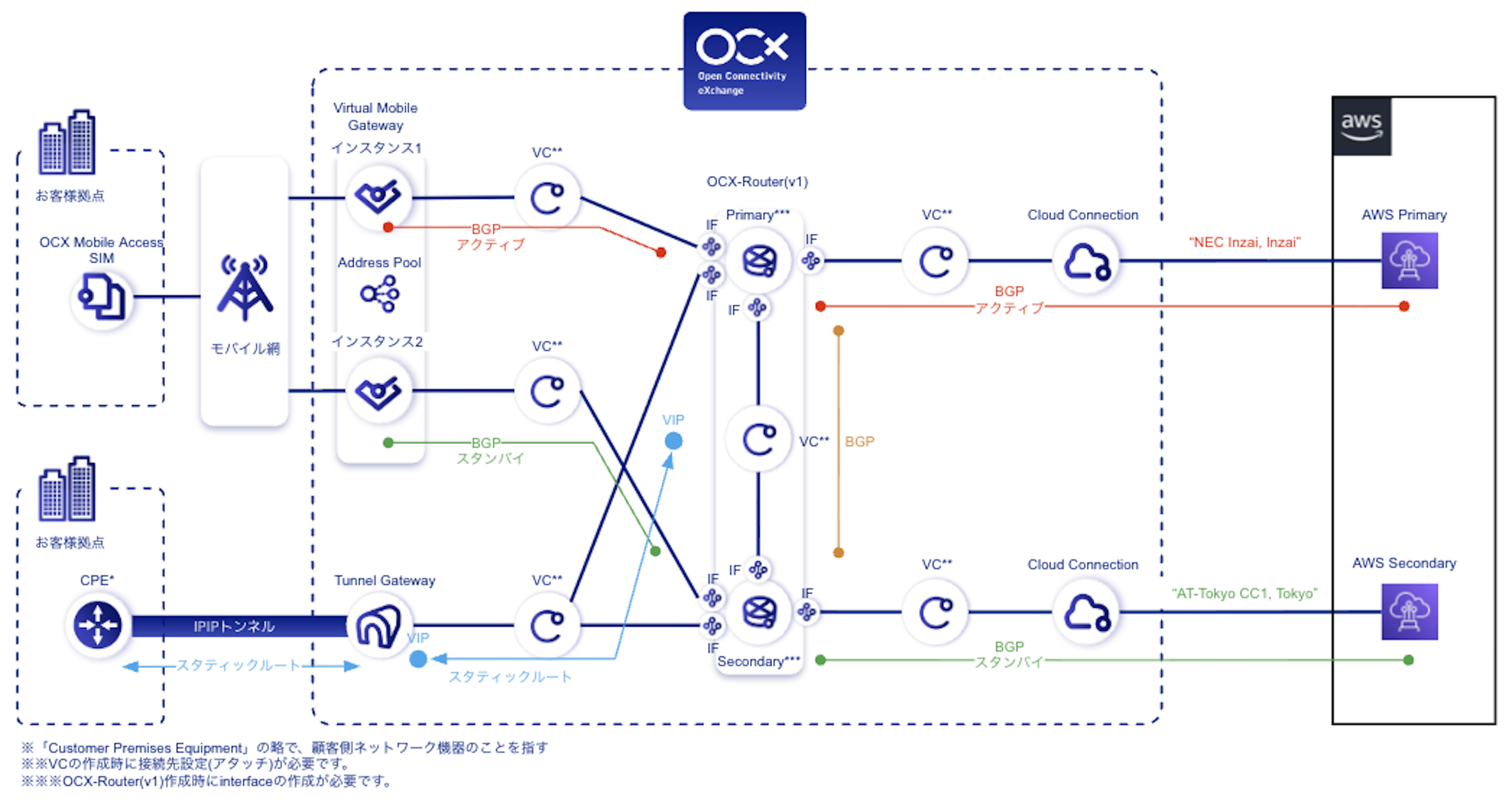
By combining the Virtual Mobile Gateway of OCX Mobile Access with the Tunnel Gateway and Cloud Connection of OCX Hikari Private, you can establish closed-network connections to cloud services like AWS from both mobile devices and optical fiber lines.
OCX Resources
| Resource | Required quantity |
|---|---|
| Virtual Mobile Gateway | 1 (2 instances) |
| Tunnel Gateway | 1 |
| VC | 6 |
| Cloud Connection | 2 |
| OCX-Router(v1) | 1 (2 instances) |
| Interface(RouterConnection) | 8 |
Structure
Overview Diagram
Benefits
- It realizes closed-network connections to cloud services like AWS from both mobile devices equipped with an OCX Mobile Access SIM and optical lines installed at each location, allowing access from anywhere without requiring dedicated leased lines.
- It is also possible to connect mobile devices equipped with an OCX Mobile Access SIM to branch offices where fiber-optic lines are installed.
Notes
- Regarding OCX Hikari Private, depending on where a failure occurs, the automatic BGP failover between the OCX-Router(v1) and the cloud may not function, meaning traffic might not be rerouted to the backup path. For details, please review the precautions in Using VRRP on OCX-Router(v1). Please fully understand the behavior and consider adopting this design only after thorough verification, including failover testing.
- Please note that this configuration diagram illustrates a design pattern where cloud connections from mobile devices and optical fiber lines are utilized independently. It is not a design pattern for using a mobile line as a backup circuit for OCX Hikari Private.
- Please design your network carefully so that AS numbers and IP segments do not overlap.
- Tunnel Gateway is configured with redundancy by default and is provided to users as a single gateway; therefore, a VIP (Virtual IP Address) is assigned at the time of creation.
- This configuration diagram is intended to clarify the required OCX resources, configuration points, and overall architecture. For aspects outside the scope of OCX services—such as CPE-side configurations—please plan and design them on your end. For supported CPEs and configuration examples when using OCX Hikari Private, please refer to Supported CPEs and Configuration Overview.
- Routing and other path controls are the responsibility of the customer.
- When using OCX-Router(v1) for cloud connections, please ensure that route redistribution for "Connected" and "Static Routes" is enabled.
- If there is a limit on the number of routes that can be received on the public cloud side, or if the number of exchanged routes exceeds that limit, please consider using the route summarization feature of OCX-Router(v1).
- For specifications and limitations regarding OCX Mobile Access, please refer to the OCX Mobile Access Overview and the Virtual Mobile Gateway Overview.