Site-to-Site and Cloud Connectivity Using SmartVPN Connection
Problem to Solve
From a SmartVPN connected site, connect privately to other sites and cloud services.
Solution with OCX
By creating a SmartVPN Connection, you can create a logical circuit from a SmartVPN connected site to OCX.
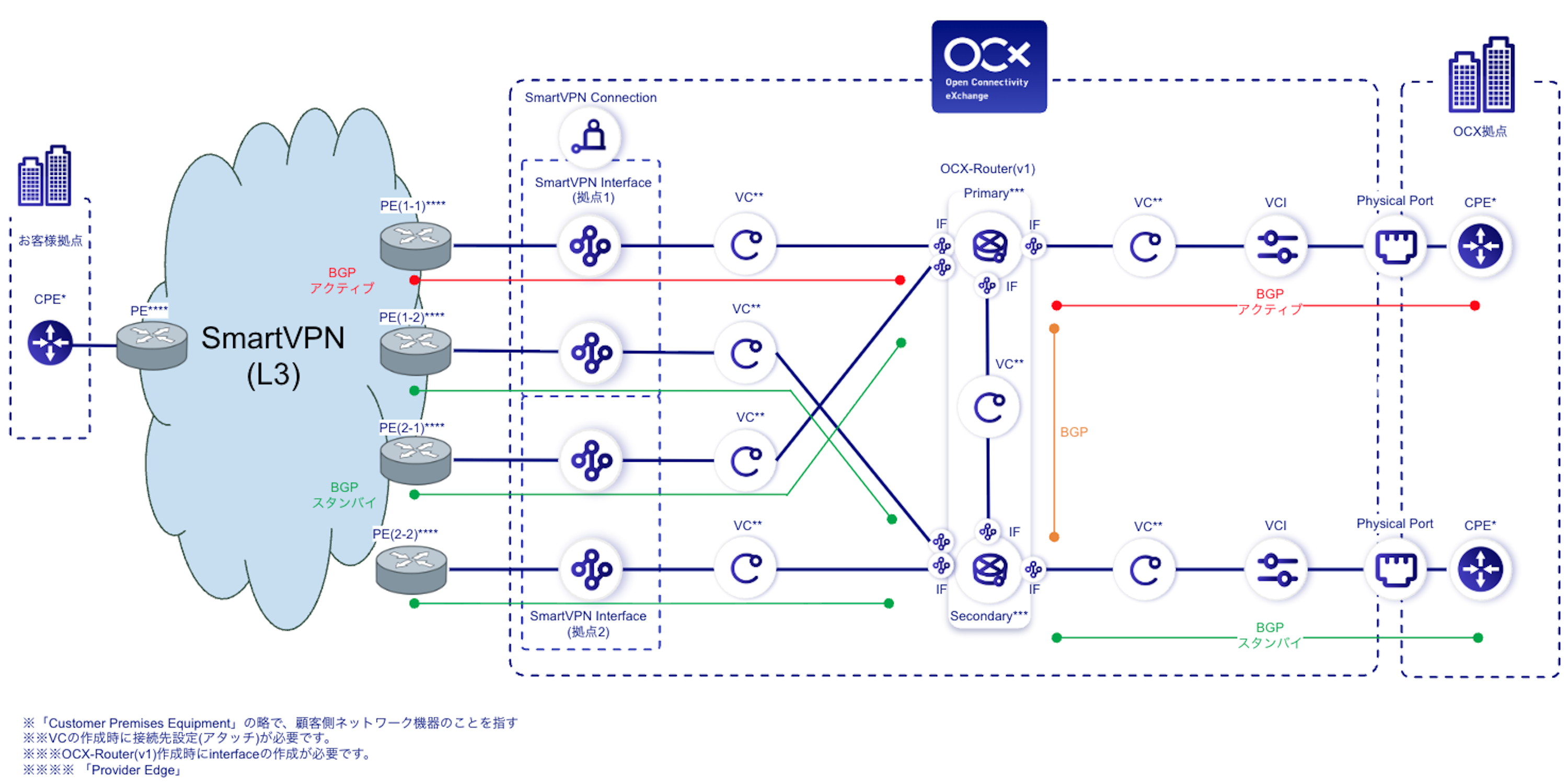
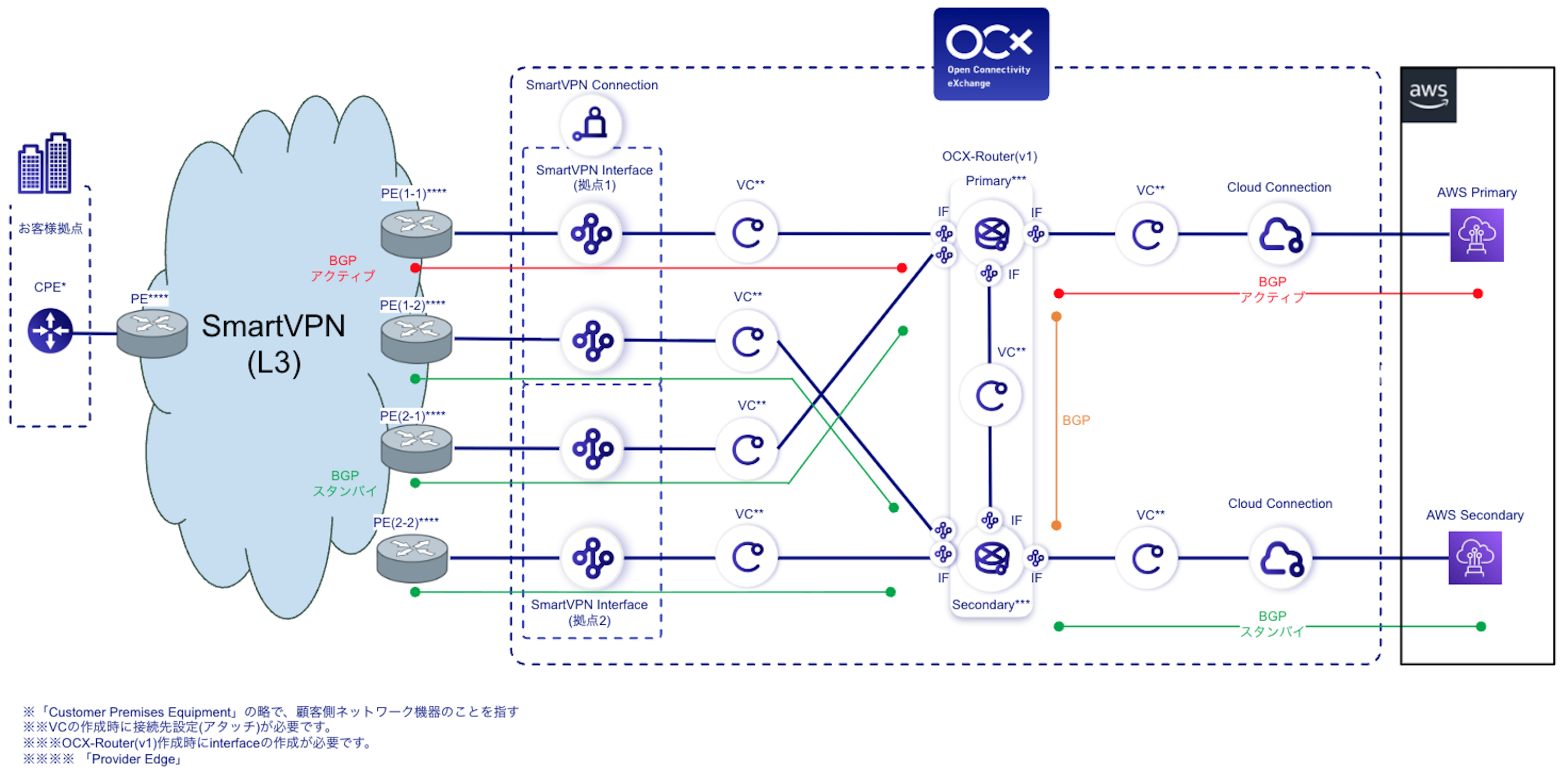
Attach the four SmartVPN Interfaces created by SmartVPN Connection to VCs and combine them with OCX-Router(v1) to connect SmartVPN connected sites to Physical Ports or Cloud Connections on OCX. This configuration provides site-to-site communication and private connectivity to cloud services.
Two SmartVPN Interfaces are created for each accommodation site on the OCX side, and each one faces a PE (Provider Edge) on the SmartVPN side. Hereafter, the PEs on the accommodation site 1 side are referred to as PE(1-1) and PE(1-2), and those on the accommodation site 2 side as PE(2-1) and PE(2-2).
OCX Resources
Site-to-Site Connectivity
| Resource | Required Quantity |
|---|---|
| SmartVPN Connection | 1 (4 interfaces) |
| VC | 7 |
| OCX-Router(v1) | 1 (2 instances) |
| Interface(RouterConnection) | 8 |
| Physical Port | 2 |
| VCI | 2 |
Cloud Connectivity
| Resource | Required Quantity |
|---|---|
| SmartVPN Connection | 1 (4 interfaces) |
| VC | 7 |
| OCX-Router(v1) | 1 (2 instances) |
| Interface(RouterConnection) | 8 |
| Cloud Connection | 2 |
Structure
Conceptual Diagram (Site-to-Site Connectivity)
Conceptual Diagram (Cloud Connectivity)
Recommended Configuration
For routing between SmartVPN and OCX-Router(v1), create BGP Parameters on each Interface of OCX-Router(v1).
SmartVPN Interfaces and VCs are Layer 2 logical circuits, so the BGP Peer is the PE on the SmartVPN side.
The following example makes the peer with PE(1-1) active and treats the remaining three peers as standby, defining the order in which failover occurs.
BGP Parameter Values for SmartVPN
| Peer PE | SmartVPN Interface used | OCX-Router(v1) Interface | Failover order | AS Path Prepend | Local Preference |
|---|---|---|---|---|---|
| PE(1-1) | Accommodation site 1 | Primary | 1st (Active) | 0 | 400 |
| PE(1-2) | Accommodation site 1 | Secondary | 2nd (Standby) | 1 | 350 |
| PE(2-1) | Accommodation site 2 | Primary | 3rd (Standby) | 2 | 300 |
| PE(2-2) | Accommodation site 2 | Secondary | 4th (Standby) | 3 | 250 |
- For Local Address and Remote Address, enter the IP addresses confirmed in the Hearing Sheet.
- Because it can affect the control of routes toward SmartVPN, turn OFF route redistribution for Connected and Static Routes on the BGP Parameters between the Primary and Secondary instances of OCX-Router(v1).
- Local Preference and AS Path Prepend control traffic in both directions. The route through PE(1-1) is used under normal conditions, and failover occurs in the order shown in the table.
BGP Parameter Values for Cloud Connection
For cloud connectivity, also create BGP Parameters on each OCX-Router(v1) Interface connected to a Cloud Connection.
Set the following Local Preference values for each pair of Cloud Connections made redundant with the Primary and Secondary instances.
| OCX-Router(v1) Interface | Local Preference |
|---|---|
| Primary | 750 |
| Secondary | 700 |
- Set the Local Preference for Cloud Connections higher than the values for SmartVPN (250 to 400).
- When adding Cloud Connections, use the same values for each pair.
- When using two OCX-Router(v1) resources for redundancy and connecting four Cloud Connections to the same destination (such as a VPC), set the Primary side of the second OCX-Router(v1) to 650 and the Secondary side to 600.
Benefits
- By centralizing routing on OCX-Router(v1), the configuration remains easier to organize when adding multiple destinations.
- SmartVPN connected sites can use OCX connectivity services without purchasing a Physical Port at an OCX site.
- By combining the four SmartVPN Interfaces with the Primary and Secondary instances of OCX-Router(v1), you can build a configuration that is redundant on both the accommodation site side and the router side.
Notes
- To use SmartVPN Connection, you need to apply for SmartVPN (L3) separately and have the Hearing Sheet submitted during SmartVPN Connection creation reviewed.
- Recommended Configuration shows a representative example. Because the values can differ depending on the connection configuration, confirm them together with the content of the Hearing Sheet.
- Network design, CPE settings, routing, and other route control on the SmartVPN side are within the customer's responsibility.
- Design the network so that AS numbers and network segments do not overlap.
- For specifications and limitations of each destination service, refer to the documentation for that service.